Every Google tag is now a Tag Manager container
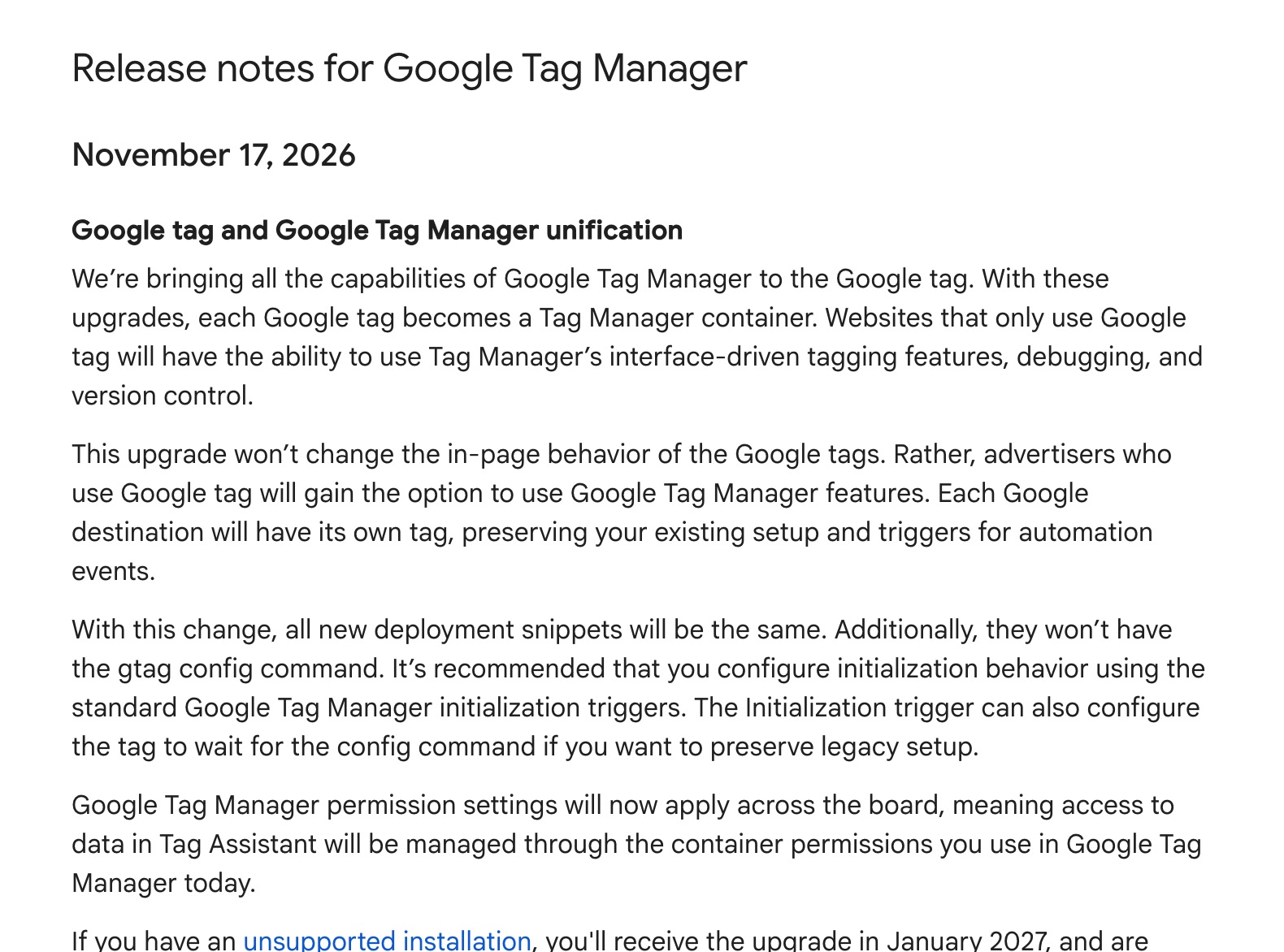
On 17 November 2026 Google added an entry to the Tag Manager release notes called Google tag and Google Tag Manager unification. From now on, every Google tag is a Tag Manager container. The tag you installed with a G- or AW- ID, often without ever opening Tag Manager, now has the same interface as a GTM container: versions, workspaces, Preview, permissions.
Google first announced the plan in May. With this release it is no longer a plan. Simo Ahava called the wider change “the biggest change in Google Tag Manager in over a decade”, and for anyone who runs Google tags outside Tag Manager it is easy to see why. This article explains what changed on 17 November, what stays the same, what it means if you route your data through a server container, and what to check this week.
What Google changed on 17 November
The release note is short. In practice it comes down to five points:
- Every Google tag becomes a container. A Google tag with a
G-(Google Analytics) orAW-(Google Ads) ID now opens in Tag Manager, with its own versions and workspaces. - Nothing changes on your pages. Google says the upgrade does not change how the tags behave on the page. Your hits, events and conversions keep going where they went before 17 November.
- Each Google product gets its own tag in that container. Your existing setup and the triggers for automatic events, such as page views and enhanced measurement, are kept.
- New installation snippets no longer contain
gtag('config'). Every new snippet looks the same. The container's Initialization trigger decides when the tags start, and can be set to wait for a config command if you want to keep an older setup working. - Permissions apply everywhere. Who can see what, including the data in Tag Assistant, now follows the container's user permissions.
Sites with an installation Google does not support, such as the Tag Manager snippet loaded with a G- or AW- ID instead of a GTM- ID, get the upgrade in January 2027. Google asks them to fix the installation before then.
How we got here
The release of 17 November is the last step in a series of changes this year. If you have been away from Tag Manager for a while, this is the order:
- 20 May 2026: Google announces that the Google tag and Tag Manager will merge.
- 9 July 2026: the container ID decides which tags a container may run. A container loaded with a
GTM-ID can run anything; one loaded with aG-orAW-ID only runs tags and variables provided by Google. - 8 October 2026: every Tag Manager snippet now starts its container on load, whether or not the page runs
gtag('config'). Config commands show up in the data layer as agtag.configevent. - 12 October 2026: Tag Manager containers can send data straight to Google's products through the new Destination tags, without loading gtag.js. Our article on Google's new tag types in Tag Manager covers that change.
- 17 November 2026: every Google tag becomes a Tag Manager container.
What it means for your setup
What you need to do depends on how Google's tags reach your site.
You only use a Tag Manager container (a GTM- ID). Little changes for you. If you accepted the optimize banner in October, your container already uses Destination tags, which send to Google without loading gtag.js. Do check who has access: people with access to a Google tag that is linked to your container get Read access to the container by default.
You have gtag.js on your site, without Tag Manager. Your Google tag now has a Tag Manager interface. You can preview a change before it goes live and roll back to an earlier version. It is still a G- or AW- container, though, so it only runs Google's own tags. A Meta pixel, a custom template or the Measurebase Data Tag does not fit in it. For those you need a GTM- container instead.
You have both: a Tag Manager container and a hard-coded gtag.js. That was two places to manage before, and it now is two containers. The risk is the same as before: the same Google Analytics ID configured in both, so every page view counts twice. See duplicate tracking.
You load the Tag Manager snippet with a G- or AW- ID. Google calls this unsupported. Before January 2027, switch to the gtag.js snippet for that ID, or to a Tag Manager snippet with your GTM- ID and the Google tags inside that container.
What it means for server-side tagging
A server container only helps when your Google tags actually send to it. That is set with server_container_url, and on many gtag.js sites that setting lives in the page itself, in the gtag('config', 'G-...', {...}) line of the snippet.
Google says in-page behaviour does not change, so a config line that worked before keeps working. Two things deserve attention:
- A new snippet has no config line. If you or your developer reinstall the Google tag from the new snippet, the
server_container_urlin the old config line is gone with it. The setting then has to live in the container: in the shared Google tag settings or on the Google Analytics tag. Without it, hits go straight to Google, and ad blockers stop exactly those requests. See Google hits that bypass your server container. - The Initialization trigger now decides when tags start. If the container no longer waits for the config command, the settings in that command arrive too late for the first hits. Move them into the container rather than relying on the timing.
Your server container itself is not part of this change. It keeps receiving what your web tags send it.
1List the Google tags on your site
Open your site with the Network tab of your browser's developer tools and filter on gtag/js and gtm.js. Note every ID you see: G-, AW-, DC- and GTM-. Also check how each one loads: from your Tag Manager container, from a plugin, or hard-coded in the theme. A site often has more Google tags than anyone remembers.
2Check who has access
Open each Google tag in Tag Manager and look at its user permissions. Since 17 November they decide who can change the tags and who can see their data in Tag Assistant. Remove former colleagues and agencies that no longer work on the site. For an agency, do this per client: an old Google tag nobody looked after may have collected users for years.
3Find where your server container URL is set
Check whether server_container_url sits in the page, in a gtag('config') line, or in Tag Manager. If it is in the page, add it to the container's shared Google tag settings or to the Google Analytics tag as well, so it survives a reinstall. Use your tagging subdomain, or your Same-Origin Tracking path when you have that verified.
4Fix unsupported installations before January
Look for a Tag Manager snippet (gtm.js) loaded with a G- or AW- ID, and for gtag('config') commands on pages without gtag.js. Both rely on behaviour Google no longer supports. Replace them with the standard gtag.js snippet, or configure the IDs inside your GTM- container and remove the hard-coded commands.
5Consider bringing it all into one container
If you already have a GTM- container, this is a good moment to move a hard-coded Google tag into it as a Google Analytics or Google Ads Destination tag, and remove the gtag.js snippet from the site. You then have one place for consent, one place for the server container URL, and one version history. Remove the old snippet in the same release that adds the new tag, so nothing counts twice in between.
6Preview and watch your hits
Preview the container that changed and load a few pages. GA4 hits should go to your tagging subdomain or Same-Origin path, not to google-analytics.com. Then compare page views and conversions for a few days against the week before. A sudden doubling points to a duplicate tag; a sudden drop to hits that no longer reach your server.
How Measurebase helps
The Measurebase tracking audit crawls your site and already checks most of what this change touches:
- a Google tag that is hard-coded on the page instead of in Tag Manager, and a Google tag loaded twice;
- config commands (
gtag('config')) that run without gtag.js, the setup Google calls unsupported; - Google tags without a server container URL, or with one that points somewhere other than your tagging host, including in the shared Google tag settings;
- Custom Event triggers that now fire on the
gtag.configevent by accident.
With Google Tag Manager connected, Measurebase proposes the fixes in a separate workspace called Measurebase. You review and publish it yourself; nothing goes live without you.
What we do not know yet
Google's release note is brief, and a few questions are still open. Practitioners reported on 16 November that the tag settings of a GA4 data stream now open a container created for that stream; Google has not documented this yet. Google has also not said whether a container created from a Google tag can be merged into an existing GTM- container, or whether the July rule that limits G- and AW- containers to Google's own tags will stay. We will update this article when Google publishes more.
Frequently asked questions
Do I need to do anything now?
Not urgently. Google says the upgrade does not change how your tags behave on the page. It is a good moment to check access and where your server container URL is set, and you must fix an unsupported installation before January 2027.
Will my GA4 or Google Ads data change?
Not from the upgrade itself. Your tags keep sending the same hits to the same place. Data changes only when someone changes the setup, for example by reinstalling the tag from a new snippet without the server container URL.
Can I add a Meta pixel or other tags to my upgraded Google tag?
No. A container with a G- or AW- ID only runs tags and variables provided by Google. For other tags, including the Measurebase Data Tag, use a Tag Manager container with a GTM- ID.
Can I opt out?
Google describes no way to opt out. The upgrade applies to every Google tag; unsupported installations follow in January 2027.
Does this change my server container?
No. The change is about web tags. Your server container keeps receiving whatever your web tags send it, so the thing to check is that they still send to your tagging host.
What is the difference with the Destination tags from October?
In October Google gave Tag Manager containers their own tags per Google product, which send without loading gtag.js. The change of 17 November goes the other way: every standalone Google tag becomes a Tag Manager container. Together they mean there is one kind of container for all of Google's tagging.