Meta Pixel measures conversions on devices from 12 November
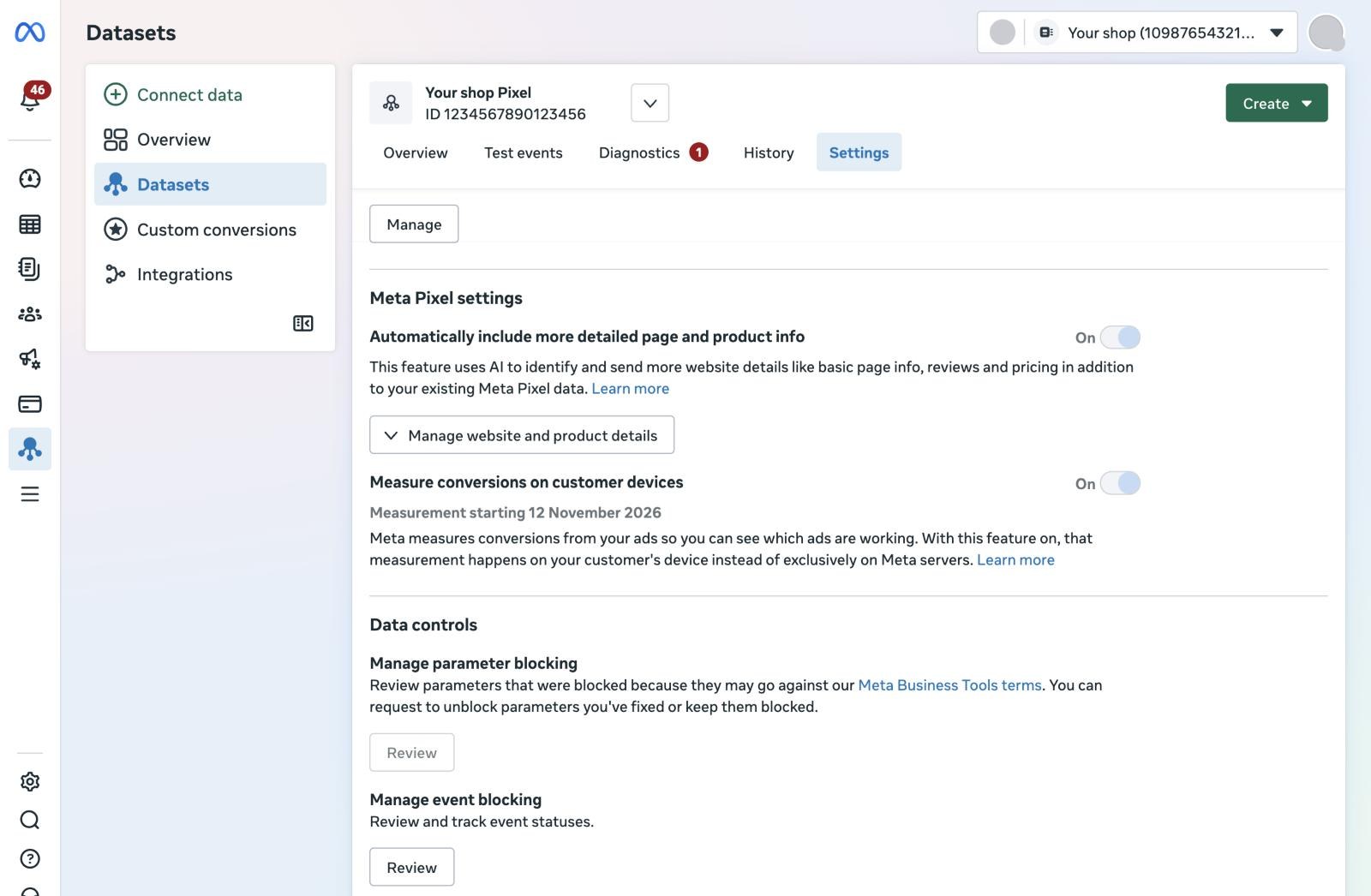
Meta has added a new setting to the Meta Pixel: Measure conversions on customer devices. It is switched on by default for every eligible pixel, and Events Manager shows "Measurement starting November 12, 2026" underneath it. From that day, Meta counts conversions it could not connect to an ad before.
That is fifteen days before Black Friday. Reported conversions can rise while your real sales stay the same, right when budgets are set for the busiest weeks of the year. This article explains what the setting does, who it affects and what to do before 12 November.
What the setting does
Meta's example: someone sees an ad for a lamp on Instagram and buys it two days later on your site. Meta cannot always connect the two. With this setting on, part of that matching happens on the customer's own device instead of only on Meta's servers, using information the customer already gave you (such as an email address) and temporary device information Meta calls non-identifying. Meta then only receives that a conversion happened and which campaign gets the credit.
- No code changes: the existing pixel does it.
- The attribution window and the attribution model stay the same.
- It works alongside the pixel and the Conversions API, and does not replace either.
Who it applies to
According to Meta, a pixel is eligible when all three are true:
- The pixel is installed directly on the page, not inside an iframe and not as an image-only pixel.
- The website asks visitors to log in with an email address or phone number.
- The visitor is not in the EU or the UK. For people there, it is not active.
For a shop that mainly sells within the EU, the effect is small: most visitors fall outside it. It does count for visitors from elsewhere, such as the United States. Meta's wording names the EU and the UK only, not Norway, Iceland, Liechtenstein or Switzerland. Shops where people buy without an account seem to fall outside it, because the login condition is not met. A setup that sends only Conversions API events, without the browser pixel on the page, does not appear to qualify either; Meta has not said so explicitly.
What it means for your numbers
Expect more attributed conversions in Ads Manager from 12 November, for the same campaigns and the same sales. Cost per purchase can fall and ROAS can rise without anything changing in your shop. Comparisons with last year's Black Friday and with the weeks before 12 November will look better than they are.
Meta has not said whether the extra conversions feed bidding and delivery, whether the purchase value travels with them, or how they are deduplicated against Conversions API events. Until it does, treat a jump after 12 November as a change in measurement, not in performance.
Privacy and consent
Meta has not explained how the setting handles consent, or what the code on the device reads. It states that you remain responsible for not sharing information with Meta that its terms prohibit. The setting is not active for visitors in the EU and the UK, but your consent banner and privacy statement still apply to visitors from elsewhere. If your site only sends Meta data after consent, check that this still holds for the pixel as a whole; the setting does not change your banner.
1Find the setting on every pixel
In Meta Events Manager, go to Data sources, choose the pixel and open Settings. The switch "Measure conversions on customer devices" sits under the Meta Pixel settings. It is per pixel, so check each one, including pixels for other brands, countries or clients.
2Decide: leave it on or switch it off
Leave it on if you want Meta to credit more conversions to your campaigns and your site meets the conditions. Switch it off if you want reporting that stays comparable through the holiday season, if your privacy statement or client contracts do not cover it, or if you want to wait until Meta answers the open questions. Meta says you can switch it off at any time.
3Record a baseline before 12 November
Export the last four weeks per campaign: purchases, purchase value, cost per purchase and ROAS in Ads Manager, and next to it the real orders and revenue from your shop or CRM. That is the only way to tell later how much of a change is measurement.
4Mark the date and tell the people who read the reports
Add an annotation for 12 November in your reports and dashboards. Agencies: tell clients before the numbers move, not after. A sudden ROAS improvement in the week before Black Friday is otherwise an easy story to believe.
5Judge on your own sales, and keep the Conversions API
Compare purchases attributed by Meta with real orders every week. Scale budgets on what your shop sees, not on the jump in Ads Manager alone. Keep sending purchases through the Conversions API with the same event ID as the pixel, so each order counts once. That part does not change: it is still the most complete signal you can give Meta, and it works for EU visitors too.
What changes with a server container
Nothing in your server container needs to change. The new setting works in the browser pixel; Conversions API events sent from your server container through Measurebase arrive at Meta as before, and Measurebase's Meta checks keep working the same way. If you run the pixel and the Conversions API together, the setting applies to the pixel side only, and only for eligible visitors.
Frequently asked questions
Do I need to change my pixel code?
No. The setting works with the pixel that is already on your site. You only decide whether it stays on.
Does this affect visitors in the Netherlands or elsewhere in the EU?
Not according to Meta: the setting is not active for people in the EU and the UK. It applies to eligible visitors from other countries.
Does the attribution window change?
No. Meta says the attribution window and the attribution model stay the same. More conversions can be attributed within that window.
Does it replace the Conversions API?
No. Meta says it works alongside the pixel and the Conversions API. Keep sending server events with the same event ID as the pixel.
Is 12 November a fixed date?
It is the date Events Manager shows under the setting. Meta's help articles describe the setting without a date. If your pixel shows another date or no label, follow what your Events Manager says.
Can I switch it off later?
Yes. Meta says the setting can be switched off at any time, per pixel, in the pixel settings in Events Manager.