Server-side tracking for Shopware with the Measurebase plugin
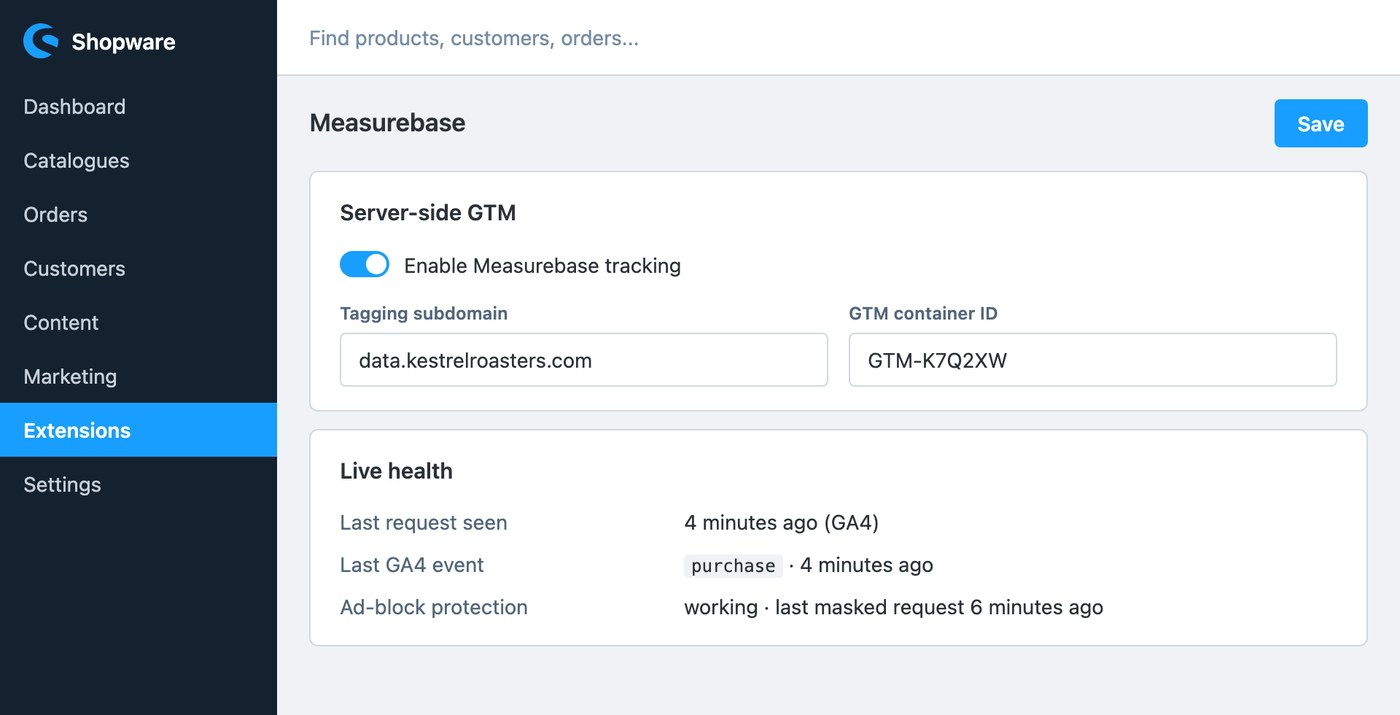
Pasting tracking snippets into a Shopware theme is fragile: the snippet lands in a template a theme update overwrites, or ends up below other scripts that fire first, and nobody notices until the numbers dip. The Measurebase plugin removes the paste step entirely - it injects the exact loader the dashboard generates for your domain, in Shopware's own tracking block, and keeps it there.
What the plugin does
- Installs the tags for you. The first-party tracking script and its noscript fallback print in Shopware's
layout_head_javascript_trackingblock on every page, byte-identical to what the dashboard's Generate script produces. With the ad-block protection power-up on, the loader carries the guard itself, so blocked tracking calls are rewritten to first-party paths. - Speaks GA4 out of the box. Switch on the ecommerce data layer and the storefront pushes view_item, add_to_cart, view_cart, begin_checkout and purchase in GA4's shape. The funnel events carry the mb_ prefix so they never collide with what your theme already pushes; purchase keeps its standard name so GA4 and your server container dedupe on the same key, and the buyer's email travels SHA-256-hashed, computed on the server, never in the browser.
- Backs every purchase up server-side. When an order is placed (or paid, your choice), the plugin reads the browser identity from the order request itself, signs the order with your server-ingest key and hands it to Shopware's message queue. The worker delivers it to Measurebase, which relays it to your tagging host exactly like the browser hit. Checkout is never slowed down, a failed delivery is logged rather than fatal, and GA4 dedupes the two copies by order number.
- Matches your feeds. Choose whether item IDs use the product number (SKU) or Shopware's internal ID, so dynamic remarketing keeps matching your Merchant Center feed.
- Plays nice with consent tools. Pick your consent tool (Usercentrics, Cookiebot, OneTrust, iubenda, Complianz) and every printed tag carries that vendor's documented do-not-block attribute, because GTM should load unconditionally and enforce consent itself via Consent Mode. Shops without a consent tool can let the plugin write the Consent Mode v2 denied-by-default state instead.
- Configured per sales channel. Set everything once for all channels, or override a field for a single channel from the scope selector at the top of the settings page.
Install in two minutes
- In Shopware Admin, go to Extensions → My extensions → Upload extension, upload the plugin zip, then install and activate it.
- Open its settings and fill in your tagging subdomain, enhanced loader token and GTM container ID - all three are on your domain's page in the Measurebase dashboard.
- Switch on tracking. Turn on ad-block protection here only once the power-up is on for the domain in Measurebase, so the tag and the server always agree.
- For the server-side purchase, add your GA4 Measurement ID and the domain's server-ingest key from the dashboard, and make sure Shopware's message queue worker is running - most production stores already run it.
🚀 Early access
Download the current version under Resources → Downloads in your dashboard. Questions about the install? Get in touch.
It adapts to the store you already run
- Self-hosted Shopware 6.5, 6.6 and 6.7. Shopware Cloud stores will be served by the upcoming Measurebase App, which packages the same storefront templates, events engine and server relay.
- Heavily customised theme? The data layer reads server data through guarded overrides of Shopware's standard storefront blocks. If your theme replaces one of them, that event simply prints nothing - the loader and the rest of the funnel keep working, and GTM Preview shows you which override to adjust.
- Redirect payment methods. For iDEAL, Klarna or bank transfer, set the server-side purchase to fire on payment received instead of order placed, so a conversion only counts once the money is in.
- What's next. Listing events (view_item_list, select_item), the checkout-step events add_shipping_info and add_payment_info, and server-side refunds are on the roadmap.
🧩 One import for your container
The GTM templates page in the dashboard has a Shopware mode: it generates a complete web-container import whose triggers match the plugin's mb_-prefixed events exactly - tags, triggers and variables in one download, including the hashed-email enhanced-conversions wiring and the browser-versus-server purchase dedup.