GA4 Data manager (beta): every data connection in one place
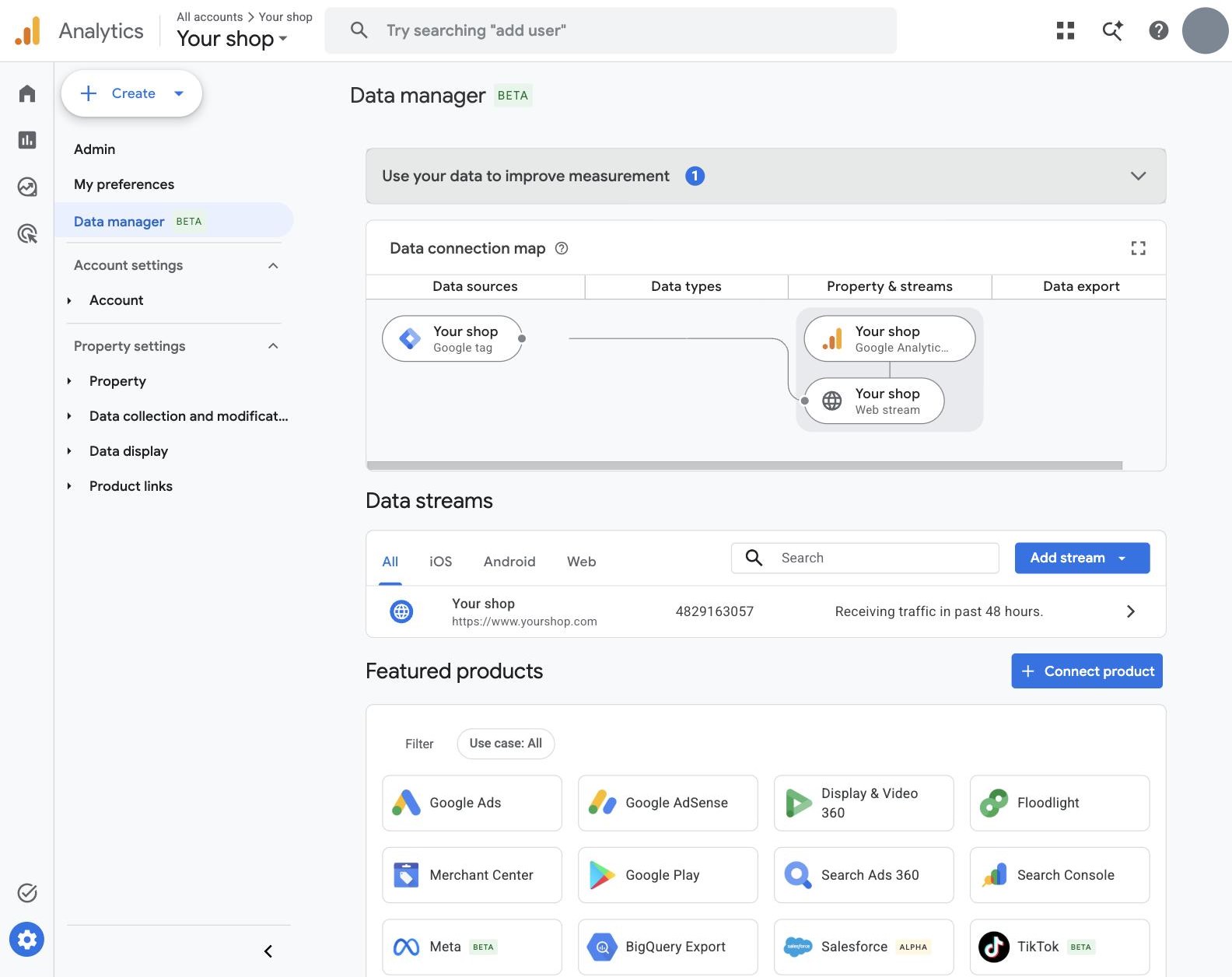
GA4 has a new page in Admin: Data manager, labelled beta. It brings together everything that sends data into a property besides the tag on your site: links to other Google products, cost data from other ad platforms, and imports from files, cloud storage and databases. The biggest change: Meta, TikTok, Snap, Pinterest and Reddit can now send their cost, clicks and impressions straight into GA4, without a spreadsheet in between.
Google announced on 10 September 2026 that it is building Data Manager into Google Analytics, and has not yet said who gets the page or when. We first saw it in a live property on 5 November 2026. This article covers what is on the page, what each connection imports, and what to check before you switch one on.
Where to find it
Open Admin. Data manager sits at the top of the left-hand menu, under My preferences, with a beta label. If your property does not show it yet, the beta has not reached it; the existing Data import page under Data collection and modification still works as before.
The page has four parts:
- Use your data to improve measurement: suggested tasks. The first one is Set up user-provided data (UPD), which sends consented first-party user data for better audience reporting and conversion measurement.
- Data connection map: a diagram from data sources, through data types, to the property and its streams. A fresh property shows only the Google tag feeding the web stream.
- Data streams: the same list as under Data collection, with the status of each stream.
- Featured products: every connection you can add, with a Connect product button and a filter by use case.
What you can connect
The connections in Featured products, as GA4 labels them:
- Google products: Google Ads, AdSense, Display & Video 360, Floodlight, Merchant Center, Google Play, Search Ads 360, Search Console, BigQuery Export, AdMob and Google Business Profile. These are the familiar product links, now listed in one place.
- Other ad platforms: Meta, TikTok, Snap, Pinterest and Reddit, each marked beta.
- CRM: Salesforce, marked alpha. Google's help pages also name HubSpot and Zoho as import sources.
- Files, storage and databases: Google Sheets, manual CSV, SFTP, BigQuery import, Google Cloud Storage, HTTPS, MySQL, PostgreSQL, Amazon Redshift, Amazon S3 and Snowflake.
What each use case imports
The filter on Featured products sorts the connections by what they bring in. In the property we checked:
- Campaign data: daily cost, clicks and impressions from ad platforms other than Google. Meta, TikTok, Snap, Pinterest and Reddit connect directly; the file, storage and database sources work too.
- Events, split into web and mobile app: events your Google tag or SDK did not collect, such as page views and transactions. For web: Salesforce, manual CSV and SFTP.
- User data, by User ID or by Client ID: user properties for audiences and segments. Manual CSV and SFTP.
- Item data (brand, category and other product details) and custom event data (extra parameters for past events): manual CSV and SFTP.
- Google platform integration: the Google product links.
Item, user and event imports existed before, under Data import. What is new is the direct link to other ad platforms, the CRM connector and the overview.
Cost data from Meta and the other platforms
This is the part most advertisers will use. According to Google's help page for Meta, the connection fills the Ads cost, Ads clicks and Ads impressions metrics for your paid Meta traffic, so cost per key event and return on ad spend can be compared across platforms in one GA4 report. The details that matter:
- It matches on UTM tags. GA4 links the imported cost to sessions by
utm_sourceandutm_medium. Every paid Meta link needs one fixed medium and either one source for all of Meta or one source per platform (Facebook, Instagram, Audience Network, Messenger, Threads). The values you enter in the setup must match the tags exactly. Google also recommendsutm_campaignandutm_id. - It goes back 24 months. A new connection tries to pull at least two years of history. Delete any earlier Meta cost import first, or the data overlaps.
- One source per ad account. Each connection links to one Meta ad account, and the same account should not come in through two sources.
- Some settings are final. The ad account, source and medium cannot be changed after the connection is made. To change them you delete the connection and create a new one.
- Currency is converted for you, also when the property currency changes later.
- Timing: an import takes up to 30 minutes, and the data can take up to 24 hours to reach reports. After that it refreshes daily.
TikTok, Snap, Pinterest and Reddit each have their own help page and follow the same model. If your UTM tags vary between campaigns, Google advises uploading the data as a table or CSV instead.
Event import is not a replacement for tracking
Importing events sounds like a way to fill gaps in tracking. It has strict limits. According to Google, an imported event needs the client_id and measurement ID of the visitor it belongs to, and it must fall within the previous two calendar days plus today. Personal data is not allowed, consent signals are recommended, and imported events can only be removed with a data deletion request. It suits offline sales and CRM events that you can tie to a known visitor. It does not bring back sessions that never reached GA4.
1Open Data manager and read the map
Check which sources already feed the property. A Meta, TikTok or Pinterest cost import that someone set up earlier through Data import shows up here too. Note it down before adding anything, so you do not import the same cost twice.
2Check your UTM tags on every paid platform
Open the URL parameters in each ad platform and write down the exact utm_source and utm_medium values. In GA4, look at Reports › Acquisition › Traffic acquisition with session source / medium to confirm those values arrive. Fix inconsistent tags first: cost that cannot be matched to a source and medium ends up beside your traffic instead of on it.
3Connect one platform as a test
You need at least the Editor role on the GA4 property and access to the business and ad account on the platform. Choose the platform under Featured products, pick Campaign data as the use case and follow the setup: sign in to the platform, choose the business and ad account, and enter the source and medium values from step 2. GA4 maps the fields itself.
4Check the result the next day
After a day, add the Ads cost metric to a traffic acquisition report or an exploration and compare the total per source with the platform's own spend for the same dates. Small differences come from time zones and currency conversion. A large gap usually means the source or medium in the setup does not match your tags. When the numbers line up, connect the other platforms the same way.
What changes with a server container
Nothing in your server container needs to change. Data manager works on the GA4 property: imports are added beside the events your tag sends, not through it. Events from your Measurebase server container keep arriving as before, with the UTM parameters of the landing page intact, which is what the cost import matches on. The Data Manager API, which Google added for server-to-server events in May 2026, is a separate route for developers and is not part of this page.
Frequently asked questions
Is Data manager available in every GA4 property?
Not yet. It is a beta, and Google has not published who gets it or when. If you do not see it under Admin, use Data import under Data collection and modification, which still works.
Does Data manager replace Data import?
It adds a page on top of it. Item, user, event and custom event imports work as before. New are the direct connections to Meta, TikTok, Snap, Pinterest and Reddit, the Salesforce connector and the data connection map.
Which role do I need?
At least Editor on the GA4 property. Linking Google products also needs the right access on the other product. Without it, GA4 shows that you have no permission to link a product.
What does the Meta connection import?
Cost, clicks and impressions per day, matched to your sessions by utm_source and utm_medium. It does not import conversions or audiences.
Can I change the ad account or the UTM values later?
No. Google says the ad account, source and medium are fixed once the connection exists. Delete the connection and create a new one to change them.
Does this change anything in Measurebase?
No. Your server container keeps sending events to GA4 as before. Data manager adds data next to those events in the property.